
DIY Mercedes Radio Serial Number - Find It Yourself [2026]
31 Ocak 2025
خدمة مستقلة لمعلومات الأكواد • دعم طوال أيام الأسبوع
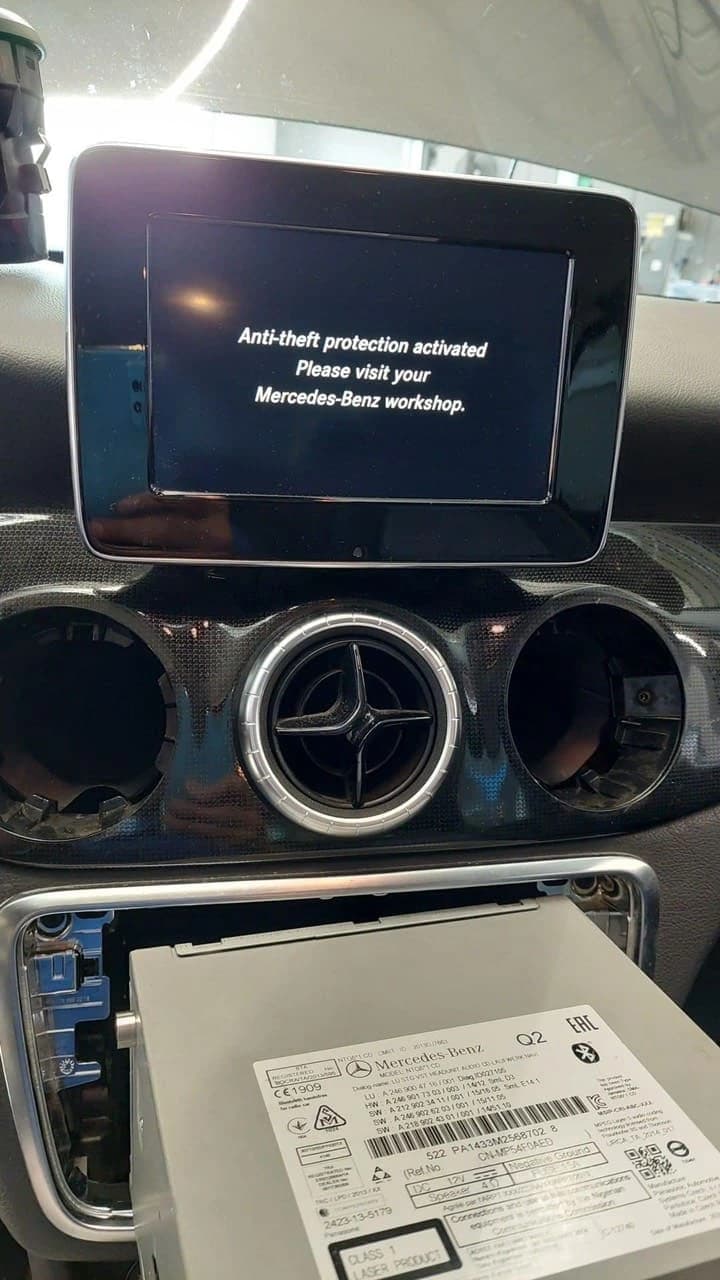
Finding the correct Mercedes radio serial number is often necessary before identifying the relevant code or support path. This guide describes several ways to locate it; availability varies by head-unit model and software version.
🛠️ Before You Start
Start with the on-screen and menu methods because they do not require removing trim. If your unit does not expose the serial number, consult its manual or use a qualified technician.
🎯 Choose Your Method
We'll cover four different methods to find your Mercedes radio serial number:
1. 🎛️ Button Combination Method (Recommended)
Compatibility varies. Some head units display a serial number after a model-specific button combination; others do not.
Step-by-Step Instructions:
- Turn on your Mercedes radio
- Make sure display is visible and working
- Press and hold buttons 1 + 3 simultaneously for 6-10 seconds
- Watch display for serial number (usually AL29xxxxx format)
- Write down the complete 14-character code
Alternative combinations to try: If buttons 1+3 don't work, try buttons 1+6 (hold 5 seconds), buttons 2+6, or buttons 1+4.
2. 📱 Menu System Method (COMAND/Modern Systems)
Compatibility varies. Some COMAND and multimedia systems expose unit information in their settings menus.
- Turn on COMAND system
- Press Setup or Settings button
- Navigate to System menu
- Look for Version or Information
- Find Hardware or Serial Number section
3. 🔧 Physical Label Method (Advanced DIY)
Most direct option: a physical label may identify the unit, but access can require trim removal and the visible number may be a part number rather than the required serial.
⚠️ Warning: This method requires radio removal and may void warranty on newer vehicles. Consider professional help if unsure.
- Use Mercedes radio removal keys (DIN keys)
- Carefully remove radio from dashboard
- Look for serial label on back or sides of radio unit
- Label usually says "Serial No.", "S/N", or "Part No."
- Write down complete number and reassemble
4. 🏆 Skip DIY - Get Professional Code
If removal or identification is unclear, ask a qualified technician to identify the unit before ordering any code service.
Understanding Serial Number Formats
Mercedes radio serial numbers come in several formats:
- AL29 Series: AL2910xxxxx (14 characters) - Most Mercedes models 2000+
- NTG Series: NTG4xxxxx (9-12 characters) - COMAND systems W204+
- Numeric Series: 1234567 (7-10 digits) - Older Mercedes, basic radios
- Mixed Format: BE1234-567 (Variable) - Becker, Alpine systems
Model-Specific Tips
W203 C-Class
Easiest removal. Standard DIN keys work. Try buttons 1+6 or 2+6 if 1+3 doesn't work.
W204 C-Class
More integrated system. Buttons 1+3 work best. COMAND units may need engineering mode.
W211 E-Class
Button combinations work well. Physical removal may require significant trim removal.
W220 S-Class
Complex removal. Professional assistance recommended for COMAND systems.
Recording Tips
- Write down EXACTLY as displayed - including dashes, letters, numbers
- Double-check each character (0 vs O, 1 vs I)
- Take photo if possible for backup
- Don't include spaces unless shown on display
Found Your Serial? Get Your Code Now!
If you have identified the unit and serial number, review the supported service and current checkout details. Not every serial format or fault can be resolved with a code.
Back to Blog